Creating a digital slambook for the design team
Our motion designer M Maglin Vinu walks us through the process.
August 18, 2025


At PhonePe, our design team has grown rapidly: from a small, tight-knit group to a diverse collective of designers, writers, and design technologists. With this growth came an interesting problem worth solving: how do we maintain the human connections that make great design teams thrive?
Figuring out the problem space
A common tradition when a new member joins our design team is to send out an intro email, allowing everyone to get acquainted. However, once those emails are sent, they often get lost in the depths of our inboxes. New members may never get to read about their teammates unless they made an effort to connect individually, or dug through their inbox.
Our second challenge was that we also wanted to foster ongoing connections with our design alumni. For example, a couple of our former colleagues were accessibility advocates in the team and they continue to inspire us even after moving on from PhonePe. We wanted to be able to maintain connections with people like them, to share knowledge and grow design as a field.
We were also aware that Slack indicates deactivated profiles with a greyed-out image. Similarly, a deactivated Gmail account might eventually be deleted.
But we wanted the hard work and creativity of our alumni to live on.
We began to wonder: What if we could create a permanent archive of our team connections, making everyone's stories accessible, new and old colleagues alike?
Phase 1: Finding patterns in the data
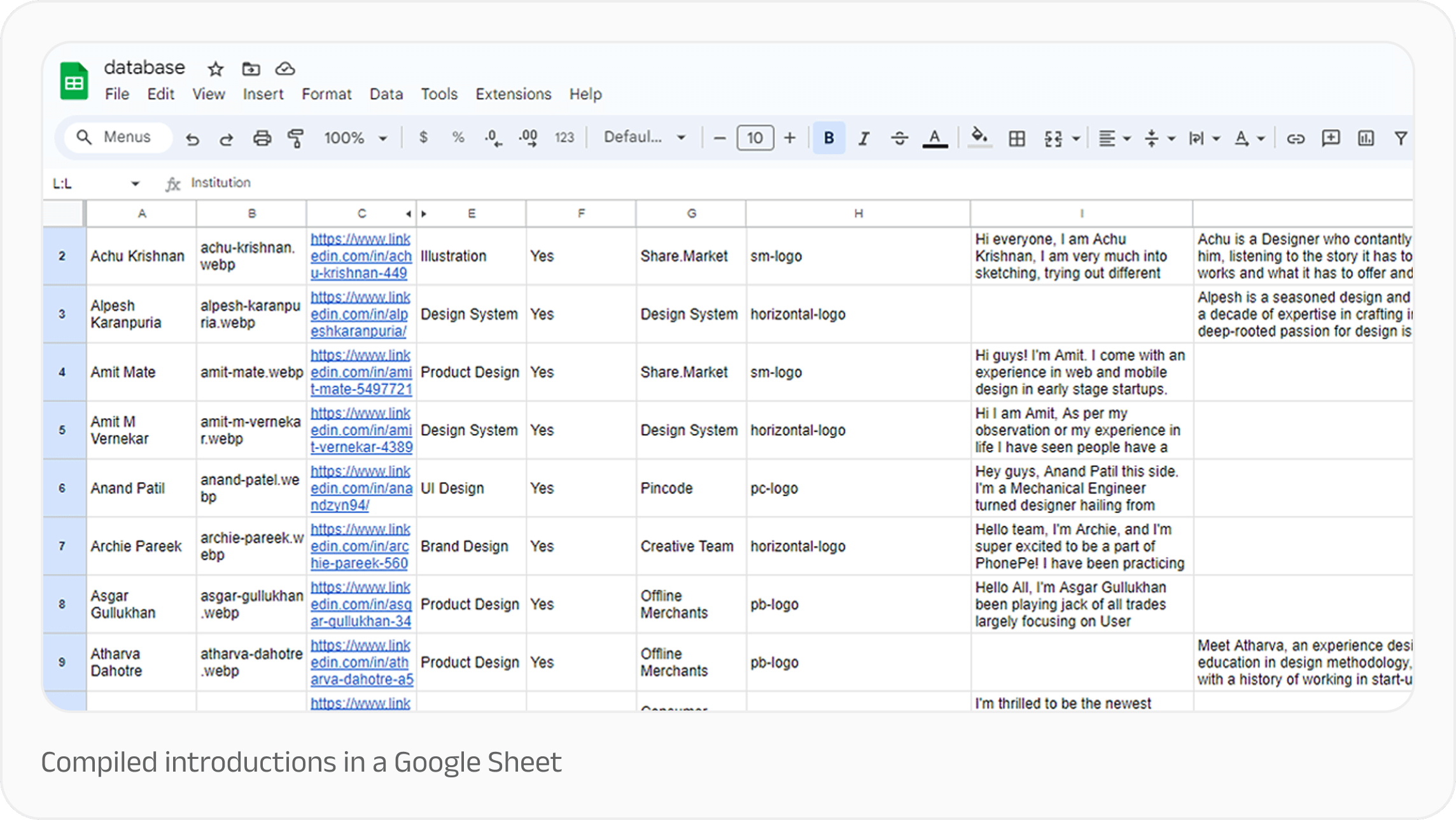
Our first task was to consolidate everyone’s introductions into a single Google Sheet.
Right off the bat, shared interests, passions, and overall vibes became apparent. That inspired us to connect team members based on these similarities. But simply sharing the spreadsheet wouldn't have done this data justice. It also didn’t preserve the legacy of our past colleagues, despite their work living on in the company.
We saw an opportunity to create something lasting: a digital slambook that would preserve the legacy of every team member, past and present.
That’s how the PurpleHive Network came into existence.
Phase 2: Creating the Hive
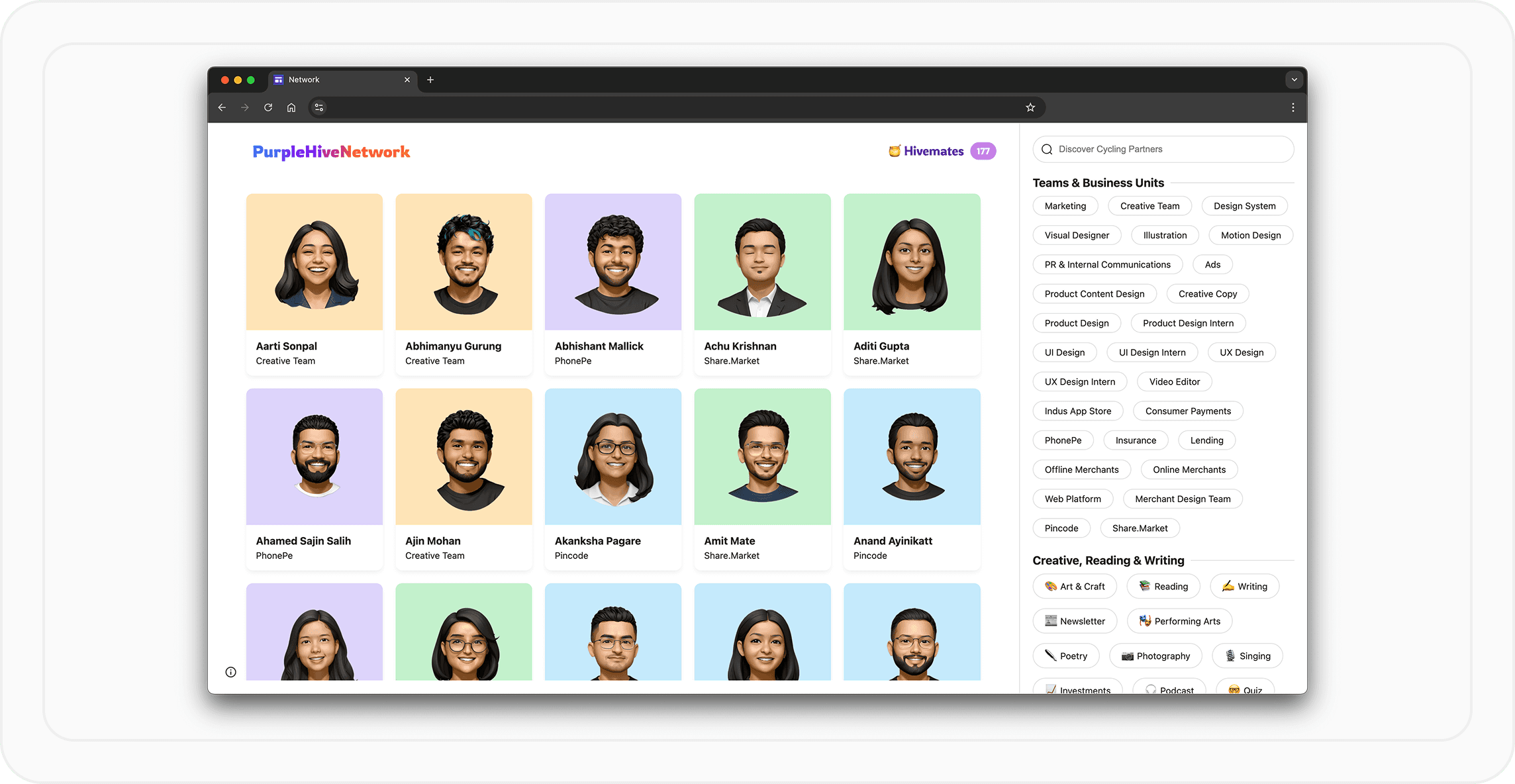
Hosted on Google Sites for controlled access and easy deployment, the PurpleHive microsite is organised around visual discovery and connection-making. We wanted to make connections feel natural and discoverable.
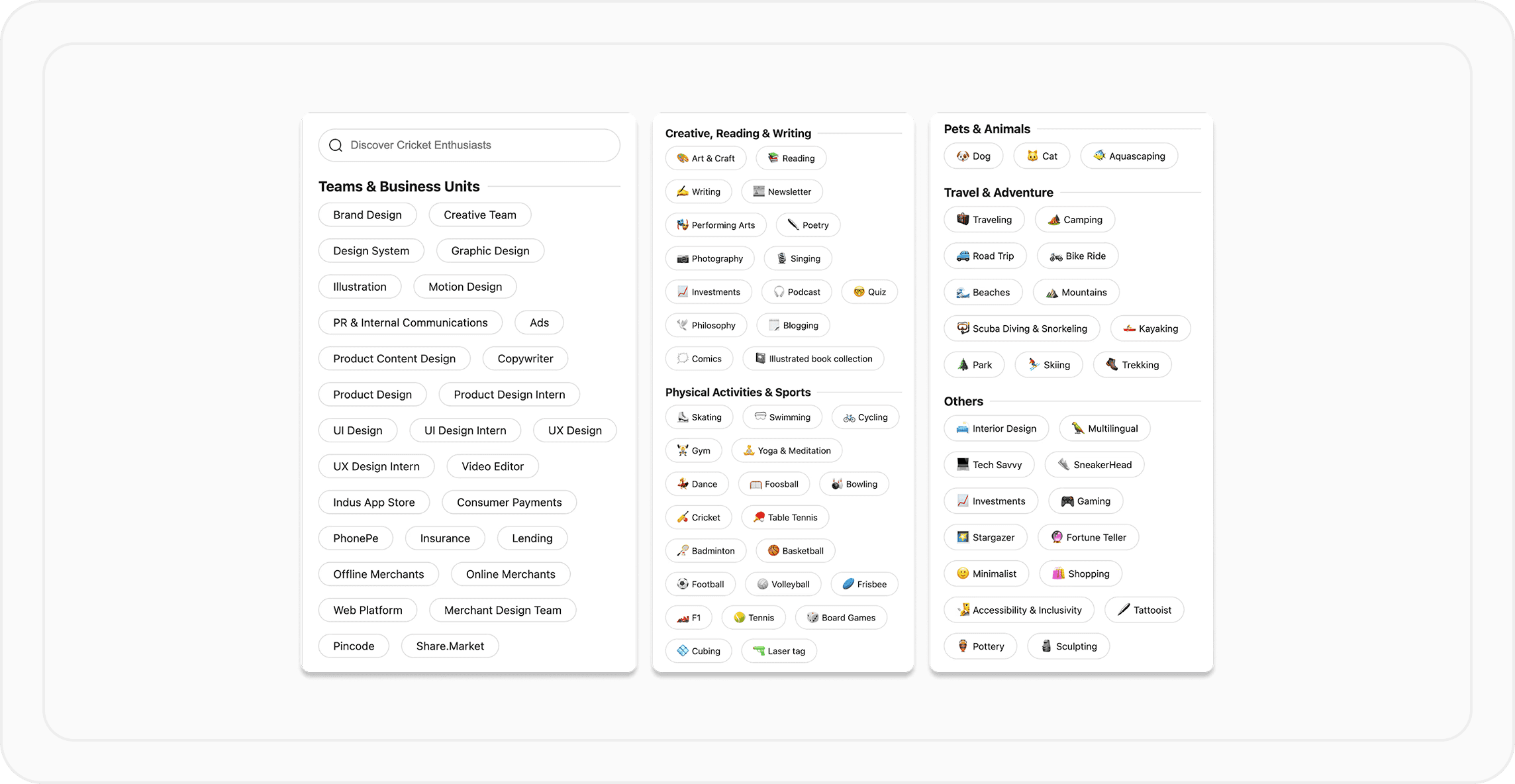
To that end, we introduced filters and discovery tools, allowing users to explore the network by teams like Product Design, Illustration, and Content Design, or dive into creative interests like Art & Craft, Writing, and Performing Arts.
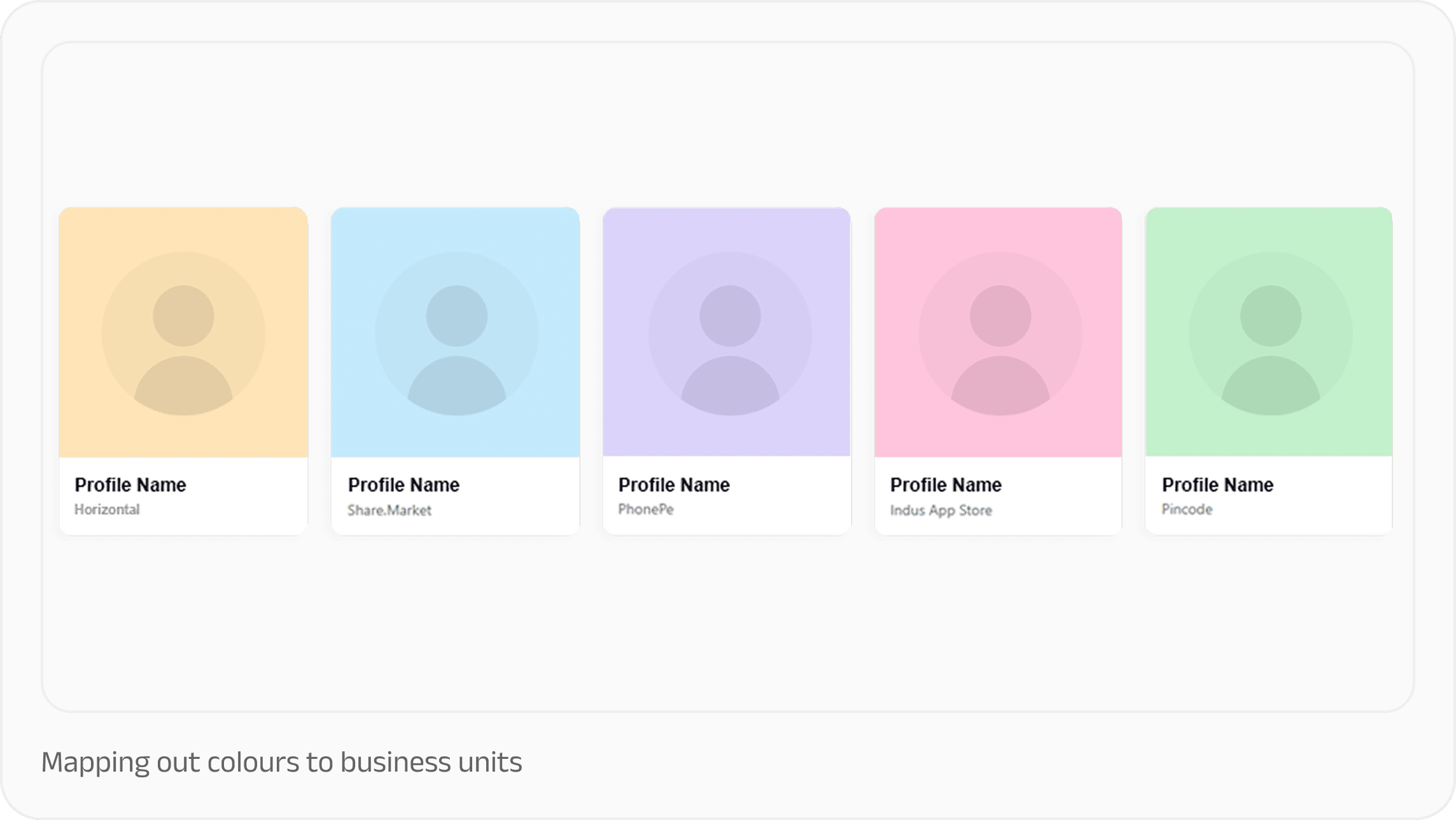
We also set each person’s profile picture against colour-coded backgrounds that represent their business units, like the iconic purple for PhonePe.
To make it particularly engaging, we also included a search functionality. Colleagues can literally "Discover Foosball Players" or find colleagues who share niche interests, turning professional networking into something more human and playful.
Phase 3: Putting a face to a name
Our next challenge was gathering profile pictures.
Not everyone had a professionally taken profile photo; others were often part of group photos, hiding in the shadows. Sourcing images of uniform dimensions while maintaining quality or coordinating a grand alumni photo shoot simply wasn't feasible. To achieve a unified style and ensure that everyone felt like part of the same family, we needed a different approach.
That's when we considered creating an avatar set. Initially, we thought about using Petris, our illustration library. But with 146 unique avatars to customise from scratch, it was clear this would be an uphill task.
In parallel, we had noticed that many of our colleagues were using memojis as their avatars, whether in their portfolios or as profile pictures. This sparked an idea: Could we generate memoji-style avatars for everyone?
Not only would they be consistent, but they would also be flexible, considering we needed transparent avatar images that could be placed over a background color matching the employee's current or last worked pod or vertical. Plus, realistic images tend to age over time. A person might change their looks over the years, but a memoji remains a timeless, stylised representation.
Our research led us to some fascinating articles, like one on making your own memoji and another on using machine learning for memoji customisation.
Creating the avatars
Since manually creating memojis wasn’t feasible, we jumped straight into the world of open-source diffusion models. Our search led us to ComfyUI, a node-based graphical interface for Stable Diffusion that helps create an array of images in a very short time.
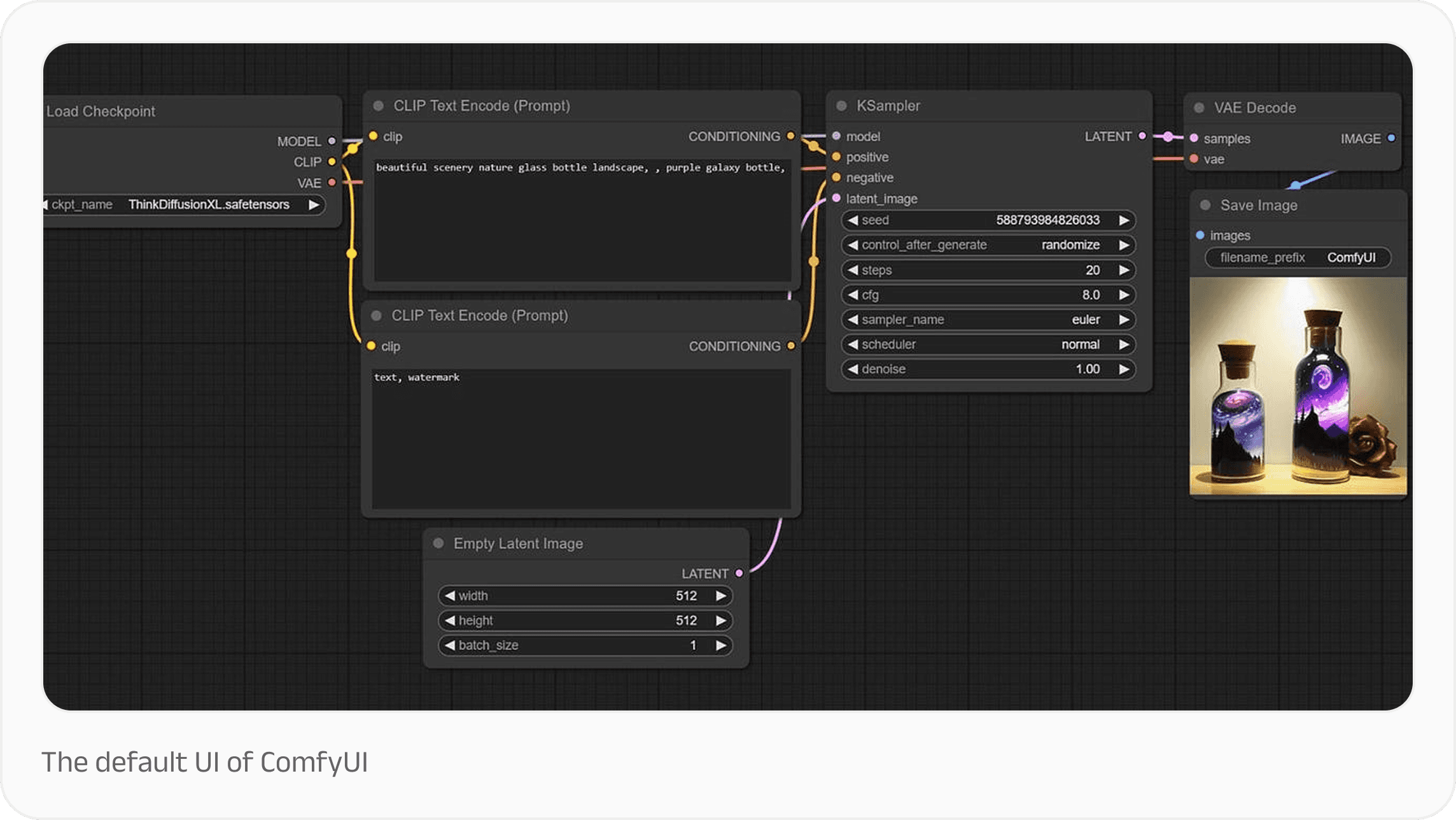
Initially, working with the interface felt like wrestling with Hakka noodles to create images. However, ComfyUI’s true power lay in combining different open-source diffusion models for endless creative possibilities. It's almost like Photoshop actions on steroids. Once you get comfortable with ComfyUI, it empowers you to create unlimited images for free. The only bottleneck is your hard drive's storage space.
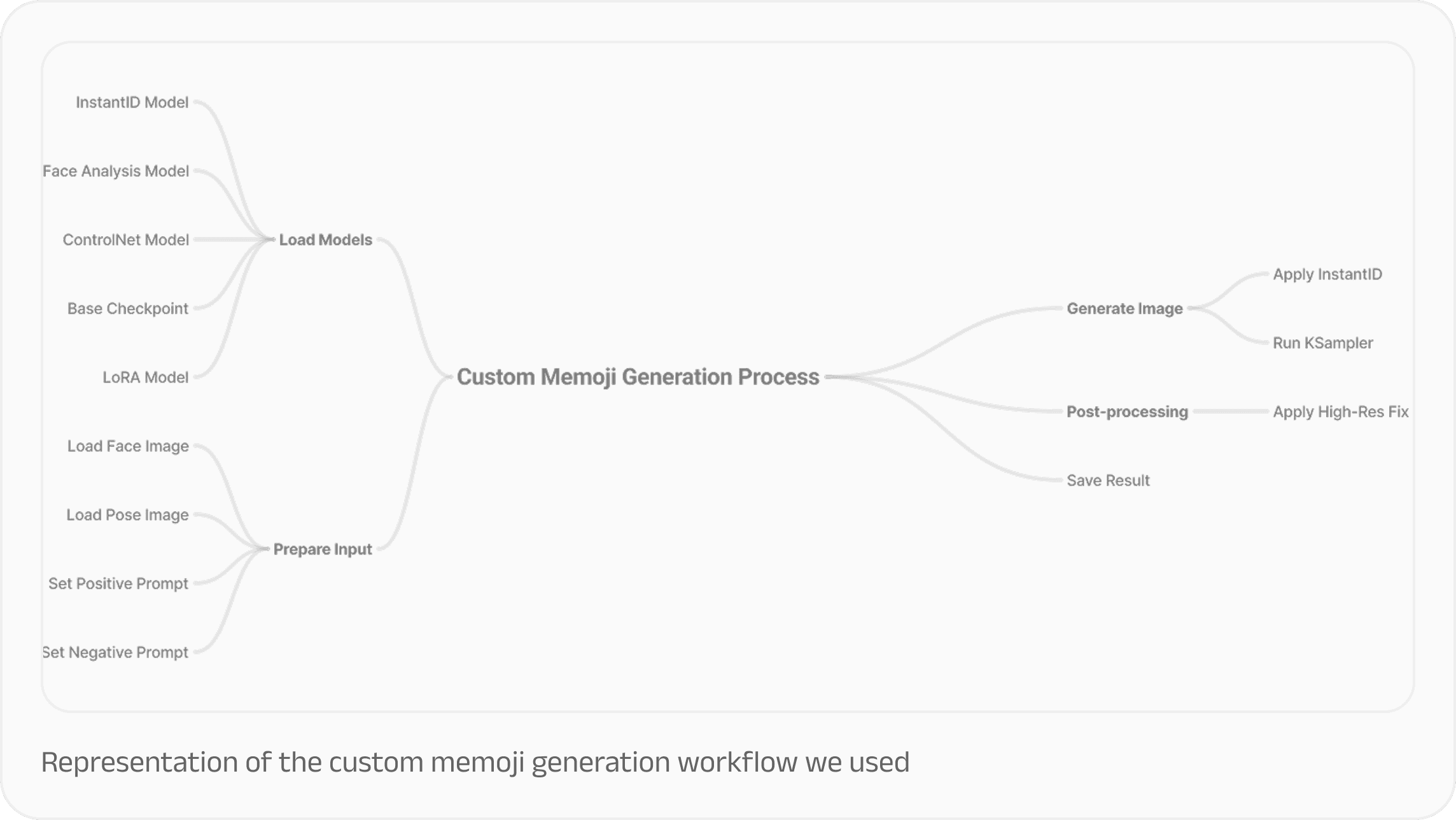
The open-source diffusion model community is so active that we were able to source a checkpoint file trained on the Stable Diffusion 1.5 base model, which had been fine-tuned on other 3D avatars. By using the right prompts and trigger words, we were able to generate memoji avatars based on input images.
But while these avatars mimicked the input images, they initially lacked the originality we wanted, and they looked like any other generic 3D emoji. To address these challenges, we had to adjust the parameters for ControlNet, InstantID, and LoRA in the current workflow.
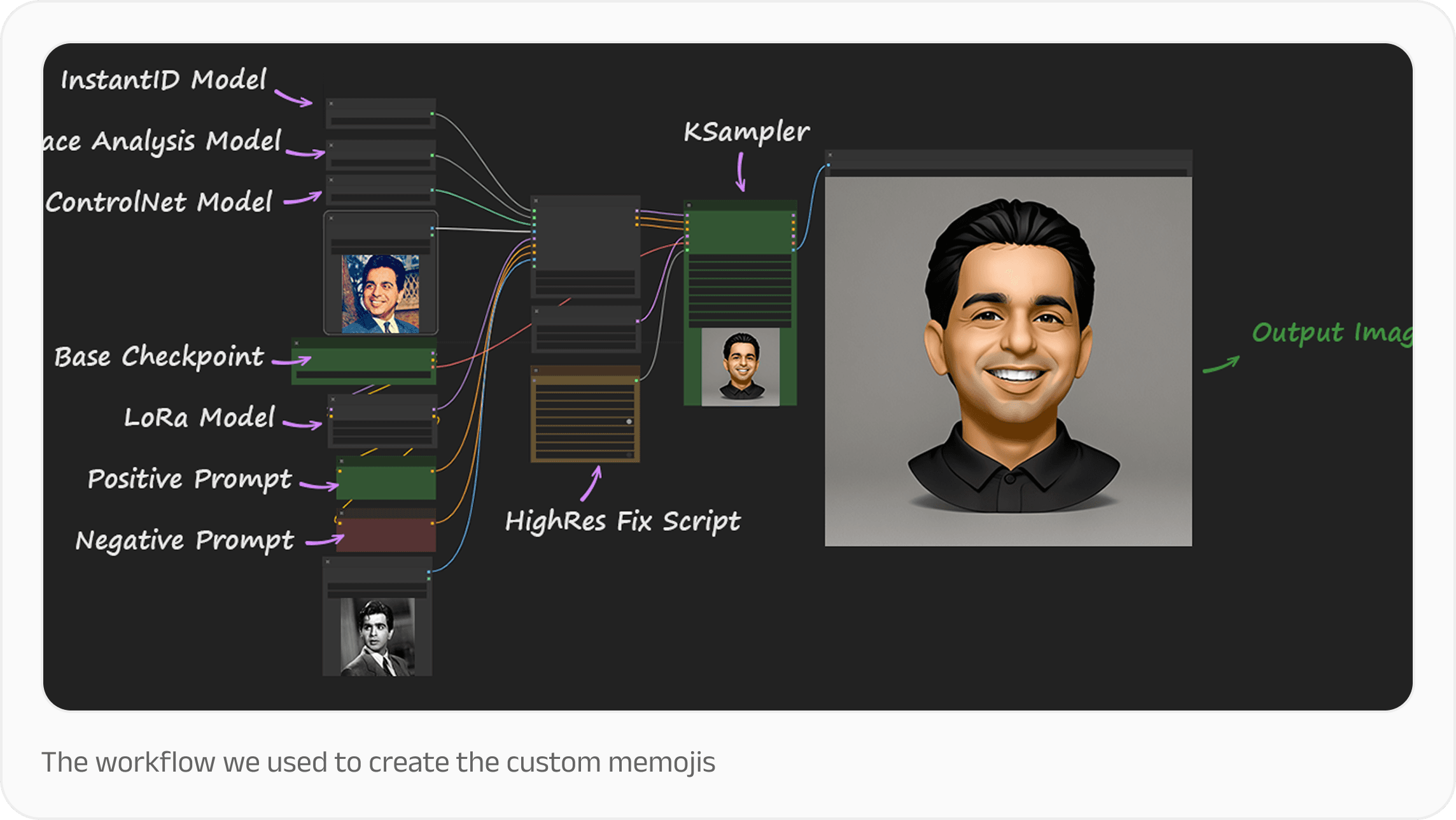
Running these models locally on a Windows machine powered by RTX GPU pushed its limits, but offered the advantage of complete data privacy. Unlike cloud-based alternatives, open-source models like Stable Diffusion can operate offline, eliminating concerns about data breaches. So by combining these three other models, we were now able to generate avatars that effectively captured the unique characteristics of each team member.
Phase 4: Building and launching the platform
With all the assets in hand, we were now able to power our digital slambook. We hooked everything up to a basic front-end UI with some JavaScript functions that covered all the features we intended to highlight. Finally, we hosted it inside Google Sites for controlled access and easy deployment.
The platform allows team members to visually map profiles to their teams, discover shared interests, and maintain connections with alumni whose work continues to influence our design culture.
In conclusion
The PurpleHive network really took off after launch. What started as a solution to preserve introduction emails has evolved into a living archive of our design team's collective knowledge and relationships.
The biggest insight from this project was realising that the technical solution—like generating AI avatars—was just one piece of the puzzle. The real value came from creating a system that honours both individual stories and collective memory. By decentralising our network and making connections accessible to everyone, we've built something that grows stronger with each new team member!
Thanks to…
Jeshmi, whose vision for Purple Hive sparked this initiative
Tarun, Yugendran, Sanjoy, Vipul, Om and Hitesh for sharing memories of PhonePe design alumni
Achu, Danish, Jose, Deepanshi, Venkatlakshmi, and Sonu for insights about the Share.Market, Pincode and Indus Appstore teams
Danish, for his work on enabling dark mode for the slambook
Gokul, Sahiti and Vismay for being the voice of our hive mascot
Sindhu, for providing her insights about our new colleagues from Obvious and editing this essay
Sanjna, Vidula and Rekha, for going above and beyond to help us complete this slambook
Yash, for his guidance on metadata
Amit Kumar Gupta, for always being there to troubleshoot bugs
Our unsung heroes: Console Log, Stack Overflow, Subreddits, Medium Articles, CodePen, Claude.ai & Perplexity.ai, for helping us debug those tricky functions
At PhonePe, our design team has grown rapidly: from a small, tight-knit group to a diverse collective of designers, writers, and design technologists. With this growth came an interesting problem worth solving: how do we maintain the human connections that make great design teams thrive?
Figuring out the problem space
A common tradition when a new member joins our design team is to send out an intro email, allowing everyone to get acquainted. However, once those emails are sent, they often get lost in the depths of our inboxes. New members may never get to read about their teammates unless they made an effort to connect individually, or dug through their inbox.
Our second challenge was that we also wanted to foster ongoing connections with our design alumni. For example, a couple of our former colleagues were accessibility advocates in the team and they continue to inspire us even after moving on from PhonePe. We wanted to be able to maintain connections with people like them, to share knowledge and grow design as a field.
We were also aware that Slack indicates deactivated profiles with a greyed-out image. Similarly, a deactivated Gmail account might eventually be deleted.
But we wanted the hard work and creativity of our alumni to live on.
We began to wonder: What if we could create a permanent archive of our team connections, making everyone's stories accessible, new and old colleagues alike?
Phase 1: Finding patterns in the data
Our first task was to consolidate everyone’s introductions into a single Google Sheet.
Right off the bat, shared interests, passions, and overall vibes became apparent. That inspired us to connect team members based on these similarities. But simply sharing the spreadsheet wouldn't have done this data justice. It also didn’t preserve the legacy of our past colleagues, despite their work living on in the company.

We saw an opportunity to create something lasting: a digital slambook that would preserve the legacy of every team member, past and present.
That’s how the PurpleHive Network came into existence.
Phase 2: Creating the Hive
Hosted on Google Sites for controlled access and easy deployment, the PurpleHive microsite is organised around visual discovery and connection-making. We wanted to make connections feel natural and discoverable.
To that end, we introduced filters and discovery tools, allowing users to explore the network by teams like Product Design, Illustration, and Content Design, or dive into creative interests like Art & Craft, Writing, and Performing Arts.
We also set each person’s profile picture against colour-coded backgrounds that represent their business units, like the iconic purple for PhonePe.

To make it particularly engaging, we also included a search functionality. Colleagues can literally "Discover Foosball Players" or find colleagues who share niche interests, turning professional networking into something more human and playful.

Phase 3: Putting a face to a name
Our next challenge was gathering profile pictures.
Not everyone had a professionally taken profile photo; others were often part of group photos, hiding in the shadows. Sourcing images of uniform dimensions while maintaining quality or coordinating a grand alumni photo shoot simply wasn't feasible. To achieve a unified style and ensure that everyone felt like part of the same family, we needed a different approach.
That's when we considered creating an avatar set. Initially, we thought about using Petris, our illustration library. But with 146 unique avatars to customise from scratch, it was clear this would be an uphill task.
In parallel, we had noticed that many of our colleagues were using memojis as their avatars, whether in their portfolios or as profile pictures. This sparked an idea: Could we generate memoji-style avatars for everyone?
Not only would they be consistent, but they would also be flexible, considering we needed transparent avatar images that could be placed over a background color matching the employee's current or last worked pod or vertical. Plus, realistic images tend to age over time. A person might change their looks over the years, but a memoji remains a timeless, stylised representation.
Our research led us to some fascinating articles, like one on making your own memoji and another on using machine learning for memoji customisation.
Creating the avatars
Since manually creating memojis wasn’t feasible, we jumped straight into the world of open-source diffusion models. Our search led us to ComfyUI, a node-based graphical interface for Stable Diffusion that helps create an array of images in a very short time.

Initially, working with the interface felt like wrestling with Hakka noodles to create images. However, ComfyUI’s true power lay in combining different open-source diffusion models for endless creative possibilities. It's almost like Photoshop actions on steroids. Once you get comfortable with ComfyUI, it empowers you to create unlimited images for free. The only bottleneck is your hard drive's storage space.

The open-source diffusion model community is so active that we were able to source a checkpoint file trained on the Stable Diffusion 1.5 base model, which had been fine-tuned on other 3D avatars. By using the right prompts and trigger words, we were able to generate memoji avatars based on input images.
But while these avatars mimicked the input images, they initially lacked the originality we wanted, and they looked like any other generic 3D emoji. To address these challenges, we had to adjust the parameters for ControlNet, InstantID, and LoRA in the current workflow.

Running these models locally on a Windows machine powered by RTX GPU pushed its limits, but offered the advantage of complete data privacy. Unlike cloud-based alternatives, open-source models like Stable Diffusion can operate offline, eliminating concerns about data breaches. So by combining these three other models, we were now able to generate avatars that effectively captured the unique characteristics of each team member.
Phase 4: Building and launching the platform
With all the assets in hand, we were now able to power our digital slambook. We hooked everything up to a basic front-end UI with some JavaScript functions that covered all the features we intended to highlight. Finally, we hosted it inside Google Sites for controlled access and easy deployment.
The platform allows team members to visually map profiles to their teams, discover shared interests, and maintain connections with alumni whose work continues to influence our design culture.

In conclusion
The PurpleHive network really took off after launch. What started as a solution to preserve introduction emails has evolved into a living archive of our design team's collective knowledge and relationships.
The biggest insight from this project was realising that the technical solution—like generating AI avatars—was just one piece of the puzzle. The real value came from creating a system that honours both individual stories and collective memory. By decentralising our network and making connections accessible to everyone, we've built something that grows stronger with each new team member!
Thanks to…
Jeshmi, whose vision for Purple Hive sparked this initiative
Tarun, Yugendran, Sanjoy, Vipul, Om and Hitesh for sharing memories of PhonePe design alumni
Achu, Danish, Jose, Deepanshi, Venkatlakshmi, and Sonu for insights about the Share.Market, Pincode and Indus Appstore teams
Danish, for his work on enabling dark mode for the slambook
Gokul, Sahiti and Vismay for being the voice of our hive mascot
Sindhu, for providing her insights about our new colleagues from Obvious and editing this essay
Sanjna, Vidula and Rekha, for going above and beyond to help us complete this slambook
Yash, for his guidance on metadata
Amit Kumar Gupta, for always being there to troubleshoot bugs
Our unsung heroes: Console Log, Stack Overflow, Subreddits, Medium Articles, CodePen, Claude.ai & Perplexity.ai, for helping us debug those tricky functions
Read next

If this excites you,
let's build together
Sign up to get updates about new essays and design events

If this excites you,
let's build together
Sign up to get updates about new essays and design events

If this excites you,
let's build together
Sign up to get updates about new essays and design events